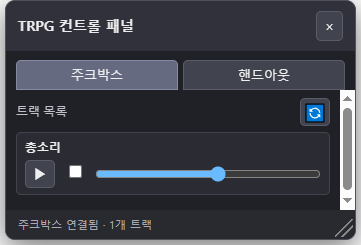
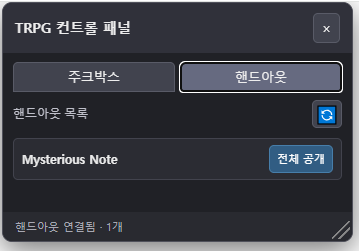
주크박스와 핸드아웃을 팝업으로 관리할 수 있습니다.
개인용으로 만들었기 때문에 많은 기능이 구현되어 있진 않습니다.
핸드아웃의 경우 '모두에게 띄우기'를 하지 않고 전체 공개를 간단히 하기 위한 기능만 추가되어 있습니다.
챗지피티를 이용하여 제작하였습니다.
// ==UserScript==
// @name Roll20 TRPG Control Panel
// @namespace roll20-trpg-control-panel
// @version 0.1.3
// @description Roll20 주크박스와 핸드아웃을 위한 통합 팝업
// @match https://app.roll20.net/editor/*
// @run-at document-idle
// @grant none
// ==/UserScript==
(() => {
'use strict';
// 중복 실행 방지
const ROOT_ID = 'rtcp-root';
// 캐릭터 시트 독립 페이지에서는 실행하지 않음
if (window.location.pathname.startsWith('/editor/character/')) {
return;
}
// iframe 내부에서는 컨트롤 패널을 생성하지 않음
if (window.self !== window.top) return;
// 같은 문서에서 중복 생성 방지
if (document.getElementById(ROOT_ID)) return;
const state = {
tab: 'music',
minimized: false,
dragging: false,
dragX: 0,
dragY: 0,
startX: 0,
startY: 0,
};
const STYLE_ID = 'rtcp-style';
let musicStatusTimer = null;
// --------------------------------------------------
// 1. 스타일
// --------------------------------------------------
const style = document.createElement('style');
style.id = STYLE_ID;
style.textContent = `
#${ROOT_ID} {
position: fixed;
top: 100px;
right: 24px;
z-index: 2147483000;
width: 350px;
height: 420px;
min-width: 280px;
min-height: 220px;
max-width: 90vw;
max-height: 90vh;
display: flex;
flex-direction: column;
color: #ececec;
background: #202126;
border: 1px solid #50515b;
border-radius: 10px;
box-shadow: 0 8px 30px #0008;
font: 13px/1.4 sans-serif;
overflow: hidden;
}
#${ROOT_ID} * {
box-sizing: border-box;
}
#${ROOT_ID} button,
#${ROOT_ID} input {
font: inherit;
}
#${ROOT_ID} button {
cursor: pointer;
color: #eee;
background: #41434e;
border: 1px solid #595b67;
border-radius: 5px;
padding: 5px 8px;
}
#${ROOT_ID} button:hover {
background: #555866;
}
#rtcp-root {
position: fixed;
}
#rtcp-resize-handle {
position: absolute;
right: 2px;
bottom: 2px;
width: 18px;
height: 18px;
cursor: nwse-resize;
touch-action: none;
z-index: 5;
background:
linear-gradient(
135deg,
transparent 45%,
#888 46%,
#888 52%,
transparent 53%,
transparent 65%,
#888 66%,
#888 72%,
transparent 73%
);
}
#rtcp-header {
display: flex;
align-items: center;
justify-content: space-between;
padding: 10px 12px;
background: #30313a;
cursor: move;
user-select: none;
}
#rtcp-title {
font-weight: 700;
font-size: 14px;
}
.rtcp-header-buttons {
display: flex;
gap: 5px;
}
#rtcp-tabs {
display: flex;
gap: 5px;
padding: 9px 10px 0;
}
#rtcp-tabs button {
flex: 1;
border-radius: 5px 5px 0 0;
}
#rtcp-tabs button[aria-selected="true"] {
background: #666a80;
border-color: #8589a2;
}
#rtcp-body {
padding: 8px 10px;
overflow-y: auto;
min-height: 0;
flex: 1 1 auto;
}
#rtcp-body h3 {
font-size: 12px;
font-weight: 500;
color: #bfc0ca;
margin: 0;
}
.rtcp-section {
margin-bottom: 10px;
}
.rtcp-section-heading {
display: flex;
align-items: center;
justify-content: space-between;
margin: 0 0 6px;
}
.rtcp-refresh-button {
width: 30px;
height: 28px;
padding: 0 !important;
font-size: 17px !important;
line-height: 1;
}
.rtcp-muted {
color: #b3b4be;
font-size: 11px;
}
.rtcp-item {
padding: 6px 8px;
margin: 4px 0;
background: #2b2c33;
border: 1px solid #42434d;
border-radius: 5px;
}
.rtcp-item-title {
font-size: 12px;
font-weight: 600;
margin-bottom: 4px;
overflow-wrap: anywhere;
line-height: 1.35;
}
/* 핸드아웃 이름과 권한 버튼을 한 줄에 배치 */
.rtcp-handout-row {
display: flex;
align-items: center;
gap: 8px;
}
.rtcp-handout-row .rtcp-item-title {
flex: 1 1 auto;
min-width: 0;
margin-bottom: 0;
}
.rtcp-grant-button {
flex: 0 0 auto;
white-space: nowrap;
font-size: 11px !important;
padding: 5px 7px !important;
background: #315d83 !important;
border-color: #477eaa !important;
color: #fff !important;
}
.rtcp-grant-button:hover {
background: #3d739f !important;
}
.rtcp-grant-button:disabled {
opacity: 0.6;
cursor: wait;
}
/* 이미 공개됐거나 공개 완료된 상태 */
.rtcp-grant-button.rtcp-grant-status {
background: #41434e !important;
border-color: #595b67 !important;
color: #eee !important;
opacity: 1;
cursor: default;
}
.rtcp-track-controls {
display: flex;
align-items: center;
gap: 8px;
min-width: 0;
}
.rtcp-play-button {
flex: 0 0 30px;
width: 30px;
height: 28px;
padding: 0 !important;
font-size: 15px !important;
line-height: 1;
}
.rtcp-loop-label {
display: flex;
align-items: center;
justify-content: center;
flex: 0 0 24px;
cursor: pointer;
}
.rtcp-loop-checkbox {
margin: 0;
width: 15px;
height: 15px;
cursor: pointer;
accent-color: #8589b8;
}
.rtcp-range {
flex: 1 1 auto;
min-width: 40px;
width: 100%;
height: 18px;
margin: 0;
cursor: pointer;
accent-color: #69baff;
}
.rtcp-notice {
padding: 8px;
margin: 8px 0;
background: #37332a;
border: 1px solid #64583d;
border-radius: 5px;
color: #f0d9a6;
}
#rtcp-footer {
padding: 7px 12px;
color: #a8a9b4;
background: #292a30;
font-size: 11px;
}
#${ROOT_ID}.rtcp-minimized {
width: 220px;
}
#${ROOT_ID}.rtcp-minimized #rtcp-tabs,
#${ROOT_ID}.rtcp-minimized #rtcp-body,
#${ROOT_ID}.rtcp-minimized #rtcp-footer {
display: none;
}
`;
document.head.appendChild(style);
// --------------------------------------------------
// 2. 팝업 생성
// --------------------------------------------------
const root = document.createElement('section');
root.id = ROOT_ID;
root.innerHTML = `
<header id="rtcp-header">
<span id="rtcp-title">TRPG 컨트롤 패널</span>
<div class="rtcp-header-buttons">
<button type="button" id="rtcp-close"
aria-label="닫기">×</button>
</div>
</header>
<nav id="rtcp-tabs" aria-label="기능 선택">
<button type="button" data-tab="music"
aria-selected="true">주크박스</button>
<button type="button" data-tab="handouts"
aria-selected="false">핸드아웃</button>
</nav>
<main id="rtcp-body"></main>
<footer id="rtcp-footer">
Roll20 기본 기능 연결 준비 중
</footer>
<div id="rtcp-resize-handle"
role="separator"
aria-label="패널 크기 조절"
title="드래그하여 패널 크기 조절"></div>
`;
document.body.appendChild(root);
const body = root.querySelector('#rtcp-body');
const footer = root.querySelector('#rtcp-footer');
// --------------------------------------------------
// 3. 공통 유틸리티
// --------------------------------------------------
function makeElement(tag, className, text) {
const element = document.createElement(tag);
if (className) element.className = className;
if (text !== undefined) element.textContent = text;
return element;
}
function makeButton(label, onClick, className = '') {
const button = makeElement('button', className, label);
button.type = 'button';
button.addEventListener('click', onClick);
return button;
}
function makeSection(title) {
const section = makeElement('section', 'rtcp-section');
const heading = makeElement(
'div',
'rtcp-section-heading'
);
heading.appendChild(makeElement('h3', '', title));
section.appendChild(heading);
return section;
}
function isVisible(element) {
if (!element || !element.isConnected) return false;
const computedStyle = getComputedStyle(element);
const rect = element.getBoundingClientRect();
return computedStyle.display !== 'none'
&& computedStyle.visibility !== 'hidden'
&& Number(computedStyle.opacity) !== 0
&& rect.width > 0
&& rect.height > 0;
}
function normalizedText(element) {
return (element?.innerText || element?.textContent || '')
.replace(/\s+/g, ' ')
.trim();
}
// --------------------------------------------------
// 4. Roll20 기본 패널 열기
// --------------------------------------------------
function findNativeControl(pattern) {
const candidates = document.querySelectorAll(
'button, a, [role="button"], [title], [aria-label]'
);
for (const element of candidates) {
if (root.contains(element) || !isVisible(element)) continue;
const label = [
normalizedText(element),
element.getAttribute('title') || '',
element.getAttribute('aria-label') || '',
].join(' ');
if (pattern.test(label)) return element;
}
return null;
}
function openNativePanel(pattern, panelName) {
const control = findNativeControl(pattern);
if (!control) {
alert(
`${panelName} 패널을 자동으로 찾지 못했습니다.\n` +
'Roll20 화면에서 해당 패널을 직접 열어 주세요.'
);
return false;
}
control.click();
return true;
}
// --------------------------------------------------
// 5. 주크박스
// --------------------------------------------------
function getMusicCandidates() {
const jukeboxRoot = document.querySelector(
'#jukeboxfolderroot'
);
if (!jukeboxRoot) return [];
return [
...jukeboxRoot.querySelectorAll('.jukeboxitem')
];
}
// DOM이 교체될 수 있으므로 트랙 ID로 매번 다시 찾는다.
function findCurrentTrack(itemId) {
if (!itemId) return null;
return getMusicCandidates().find(
track => track.getAttribute('data-itemid') === itemId
) || null;
}
function renderMusic() {
if (musicStatusTimer !== null) {
window.clearInterval(musicStatusTimer);
musicStatusTimer = null;
}
body.replaceChildren();
// 트랙 목록 제목 및 새로고침
const listSection = makeSection('트랙 목록');
const heading = listSection.querySelector(
'.rtcp-section-heading'
);
heading.appendChild(makeButton(
'🔄',
renderMusic,
'rtcp-refresh-button'
));
body.appendChild(listSection);
const tracks = getMusicCandidates();
const syncFunctions = [];
if (tracks.length === 0) {
listSection.appendChild(makeElement(
'div',
'rtcp-notice',
'트랙을 찾을 수 없습니다. Roll20 주크박스를 열고 새로고침해 주세요.'
));
}
tracks.forEach((originalTrack, index) => {
const itemId = originalTrack.getAttribute('data-itemid');
if (!itemId) return;
const item = makeElement('div', 'rtcp-item');
const initialTitle = normalizedText(
originalTrack.querySelector('.dd-content .title')
) || `트랙 ${index + 1}`;
// 트랙 이름
item.appendChild(makeElement(
'div',
'rtcp-item-title',
initialTitle
));
// 한 줄 컨트롤: 재생 / 반복 / 음량
const controlRow = makeElement(
'div',
'rtcp-track-controls'
);
// 재생 / 정지
const playButton = makeButton(
'▶',
() => {
const currentTrack = findCurrentTrack(itemId);
const currentPlay = currentTrack?.querySelector(
'.playbackcontrol a.play'
);
if (!currentPlay) {
playButton.title = '트랙을 찾을 수 없습니다.';
return;
}
currentPlay.click();
window.setTimeout(syncTrackUI, 150);
},
'rtcp-play-button'
);
playButton.title = '재생';
controlRow.appendChild(playButton);
// 반복 재생
const loopLabel = makeElement(
'label',
'rtcp-loop-label'
);
loopLabel.title = '반복 재생';
const loopCheckbox = document.createElement('input');
loopCheckbox.type = 'checkbox';
loopCheckbox.className = 'rtcp-loop-checkbox';
loopCheckbox.setAttribute('aria-label', '반복 재생');
loopCheckbox.addEventListener('change', () => {
const currentLoop = findCurrentTrack(
itemId
)?.querySelector('.playbackcontrol input.loop');
if (!currentLoop) return;
if (currentLoop.checked !== loopCheckbox.checked) {
currentLoop.click();
}
window.setTimeout(() => {
const latestLoop = findCurrentTrack(
itemId
)?.querySelector('.playbackcontrol input.loop');
if (latestLoop) {
loopCheckbox.checked = latestLoop.checked;
}
}, 100);
});
loopLabel.appendChild(loopCheckbox);
controlRow.appendChild(loopLabel);
// 음량
const volumeSlider = document.createElement('input');
volumeSlider.type = 'range';
volumeSlider.min = '0';
volumeSlider.max = '100';
volumeSlider.step = '1';
volumeSlider.className = 'rtcp-range';
volumeSlider.setAttribute('aria-label', '트랙 음량');
volumeSlider.addEventListener('input', () => {
const currentVolume = findCurrentTrack(
itemId
)?.querySelector(
'.playbackcontrol .volume input.slider'
);
if (!currentVolume) return;
currentVolume.value = volumeSlider.value;
currentVolume.dispatchEvent(new Event('input', {
bubbles: true
}));
currentVolume.dispatchEvent(new Event('change', {
bubbles: true
}));
});
controlRow.appendChild(volumeSlider);
item.appendChild(controlRow);
listSection.appendChild(item);
// 재생 상태 동기화
function syncTrackUI() {
const currentTrack = findCurrentTrack(itemId);
const currentPlay = currentTrack?.querySelector(
'.playbackcontrol a.play'
);
if (!currentPlay) {
playButton.textContent = '▶';
playButton.title = '트랙을 찾을 수 없습니다.';
playButton.disabled = true;
return;
}
playButton.disabled = false;
const title = (
currentPlay.getAttribute('title') || ''
).trim().toLowerCase();
const dataState =
currentPlay.getAttribute('data-isplaying');
let playing;
if (['play', '재생'].includes(title)) {
playing = false;
} else if (
['stop', 'pause', '정지', '일시정지'].includes(title)
) {
playing = true;
} else {
playing = dataState === 'true';
}
playButton.textContent = playing ? '■' : '▶';
playButton.title = playing ? '정지' : '재생';
const latestLoop = currentTrack.querySelector(
'.playbackcontrol input.loop'
);
if (latestLoop &&
loopCheckbox.checked !== latestLoop.checked) {
loopCheckbox.checked = latestLoop.checked;
}
const latestVolume = currentTrack.querySelector(
'.playbackcontrol .volume input.slider'
);
if (latestVolume &&
document.activeElement !== volumeSlider &&
volumeSlider.value !== latestVolume.value) {
volumeSlider.value = latestVolume.value;
}
}
syncFunctions.push(syncTrackUI);
// 초기 상태 반영
const currentTrack = findCurrentTrack(itemId);
const currentLoop = currentTrack?.querySelector(
'.playbackcontrol input.loop'
);
const currentVolume = currentTrack?.querySelector(
'.playbackcontrol .volume input.slider'
);
if (currentLoop) {
loopCheckbox.checked = currentLoop.checked;
}
if (currentVolume) {
volumeSlider.value = currentVolume.value;
} else {
volumeSlider.value = '100';
}
syncTrackUI();
});
// 재생 상태를 주기적으로 갱신
musicStatusTimer = window.setInterval(() => {
syncFunctions.forEach(sync => sync());
}, 500);
footer.textContent = tracks.length
? `주크박스 연결됨 · ${tracks.length}개 트랙`
: '주크박스 대기 중';
}
// --------------------------------------------------
// 6. 핸드아웃
// --------------------------------------------------
// --------------------------------------------------
// 6. 핸드아웃
// --------------------------------------------------
function getHandoutCandidates() {
const journalRoot = document.querySelector('#journalfolderroot');
if (!journalRoot) return [];
return [
...journalRoot.querySelectorAll(
'.journalitem.handout[data-itemid]'
)
].filter(item => {
const name = item.querySelector('.namecontainer');
return Boolean(name && normalizedText(name));
}).map(item => ({
id: item.getAttribute('data-itemid'),
name: normalizedText(item.querySelector('.namecontainer')),
element: item
}));
}
// 지정한 ID의 Roll20 핸드아웃 창 찾기
function findHandoutDialog(handoutId) {
const contents = [
...document.querySelectorAll(
'.ui-dialog-content[data-handoutid]'
)
];
const content = contents.find(
element => element.getAttribute('data-handoutid') === handoutId
);
return content?.closest('.ui-dialog') || null;
}
// 조건이 만족될 때까지 기다리되 시간 제한 적용
function waitForCondition(check, timeout = 8000) {
return new Promise((resolve, reject) => {
const started = Date.now();
function poll() {
let result;
try {
result = check();
} catch (error) {
reject(error);
return;
}
if (result) {
resolve(result);
return;
}
if (Date.now() - started >= timeout) {
reject(new Error(
'Roll20 창 응답 시간이 초과되었습니다.'
));
return;
}
window.setTimeout(poll, 100);
}
poll();
});
}
function getEditDialog(handoutId) {
const dialog = findHandoutDialog(handoutId);
if (!dialog) return null;
return dialog.querySelector('select.inplayerjournals')
? dialog
: null;
}
function getViewDialog(handoutId) {
const dialog = findHandoutDialog(handoutId);
if (!dialog) return null;
return dialog.querySelector('button.edithandout')
? dialog
: null;
}
// 모든 플레이어에게 보기 권한 부여
async function grantViewPermission(handoutId, button) {
const originalLabel = button.textContent;
button.disabled = true;
button.textContent = '처리 중…';
try {
let editDialog = getEditDialog(handoutId);
// 편집 창이 열려 있지 않으면 보기 창부터 연다.
if (!editDialog) {
let viewDialog = getViewDialog(handoutId);
if (!viewDialog) {
const handout = getHandoutCandidates()
.find(item => item.id === handoutId);
if (!handout) {
throw new Error(
'대상 핸드아웃을 목록에서 찾을 수 없습니다.'
);
}
const nameElement =
handout.element.querySelector('.namecontainer');
if (!nameElement) {
throw new Error(
'핸드아웃 열기 요소를 찾을 수 없습니다.'
);
}
nameElement.click();
viewDialog = await waitForCondition(
() => getViewDialog(handoutId)
|| getEditDialog(handoutId)
);
// 바로 편집 창이 열린 경우도 처리
editDialog = getEditDialog(handoutId);
}
// 보기 창에서 Edit 클릭
if (!editDialog) {
const editButton =
viewDialog?.querySelector('button.edithandout');
if (!editButton) {
throw new Error(
'핸드아웃의 Edit 버튼을 찾을 수 없습니다.'
);
}
editButton.click();
editDialog = await waitForCondition(
() => getEditDialog(handoutId)
);
}
}
// 반드시 대상 ID의 편집 창인지 재확인
if (
findHandoutDialog(handoutId) !== editDialog ||
editDialog.querySelector(
'.ui-dialog-content[data-handoutid]'
)?.getAttribute('data-handoutid') !== handoutId
) {
throw new Error(
'열린 편집 창이 대상 핸드아웃과 일치하지 않습니다.'
);
}
const viewPermission =
editDialog.querySelector('select.inplayerjournals');
const saveButton = [
...editDialog.querySelectorAll('button')
].find(button =>
button.textContent.trim() === 'Save Changes'
);
if (!viewPermission || !saveButton) {
throw new Error(
'보기 권한 또는 저장 버튼을 찾을 수 없습니다.'
);
}
const allPlayers = [
...viewPermission.options
].find(option => option.value === 'all');
if (!allPlayers) {
throw new Error(
'모든 플레이어 옵션을 찾을 수 없습니다.'
);
}
// 이미 전체 공개라면 저장하지 않는다.
if (
[...viewPermission.selectedOptions]
.some(option => option.value === 'all')
) {
button.textContent = '이미 공개됨';
button.classList.add('rtcp-grant-status');
footer.textContent =
'변경 없음 · 이미 모든 플레이어에게 보기 권한이 있습니다.';
return;
}
// 보기 권한만 변경한다. 편집 권한은 수정하지 않는다.
allPlayers.selected = true;
if (window.jQuery) {
window.jQuery(viewPermission)
.trigger('chosen:updated');
window.jQuery(viewPermission)
.trigger('change');
} else {
viewPermission.dispatchEvent(
new Event('change', { bubbles: true })
);
}
// 변경 사항을 Roll20의 저장 버튼으로 제출
saveButton.click();
button.textContent = '저장 요청됨';
footer.textContent =
'저장 요청을 보냈습니다. Roll20의 반영 여부를 확인하는 중…';
// 편집 창이 닫히는지 확인
try {
await waitForCondition(
() => !getEditDialog(handoutId),
8000
);
button.textContent = '공개 완료';
button.classList.add('rtcp-grant-status');
footer.textContent =
'편집 창이 닫혔습니다. 권한이 저장되었는지 재확인할 수 있습니다.';
} catch {
button.textContent = '저장 확인 필요';
footer.textContent =
'저장 완료를 자동으로 확인하지 못했습니다. ' +
'핸드아웃을 다시 열어 권한을 확인해 주세요.';
}
} catch (error) {
console.error(
'[RTCP] 핸드아웃 보기 권한 변경 실패:',
error
);
button.textContent = '실패 · 재시도';
footer.textContent = error.message
|| '권한 변경 중 오류가 발생했습니다.';
} finally {
button.disabled = false;
// 성공이나 이미 공개 상태라면 결과를 표시하고,
// 그 외에는 버튼을 원래 상태로 복원한다.
if (
button.textContent !== '공개 완료' &&
button.textContent !== '이미 공개됨' &&
button.textContent !== '저장 확인 필요'
) {
if (button.textContent === '실패 · 재시도') {
// 오류가 발생한 버튼은 재시도할 수 있도록 복원
button.classList.remove('rtcp-grant-status');
button.textContent = originalLabel;
} else {
button.textContent = originalLabel;
}
}
}
}
function renderHandouts() {
body.replaceChildren();
const controls = makeSection('핸드아웃 목록');
const heading = controls.querySelector(
'.rtcp-section-heading'
);
heading.appendChild(makeButton(
'🔄',
renderHandouts,
'rtcp-refresh-button'
));
body.appendChild(controls);
const listSection = makeElement('section', 'rtcp-section');
const handouts = getHandoutCandidates();
if (handouts.length === 0) {
listSection.appendChild(makeElement(
'div',
'rtcp-notice',
'핸드아웃을 찾을 수 없습니다. ' +
'Roll20 저널을 열고 새로고침해 주세요.'
));
} else {
handouts.forEach(handout => {
const item = makeElement('div', 'rtcp-item');
const row = makeElement('div', 'rtcp-handout-row');
row.appendChild(makeElement(
'div',
'rtcp-item-title',
handout.name
));
const grantButton = makeButton(
'전체 공개',
() => grantViewPermission(
handout.id,
grantButton
),
'rtcp-grant-button'
);
grantButton.title =
'모든 플레이어에게 이 핸드아웃의 보기 권한을 부여합니다.';
row.appendChild(grantButton);
item.appendChild(row);
listSection.appendChild(item);
});
}
body.appendChild(listSection);
footer.textContent = handouts.length
? `핸드아웃 연결됨 · ${handouts.length}개`
: '핸드아웃 대기 중';
}
// --------------------------------------------------
// 7. 탭 전환
// --------------------------------------------------
function render() {
if (state.tab !== 'music' && musicStatusTimer !== null) {
window.clearInterval(musicStatusTimer);
musicStatusTimer = null;
}
root.querySelectorAll('#rtcp-tabs button').forEach(button => {
button.setAttribute(
'aria-selected',
String(button.dataset.tab === state.tab)
);
});
if (state.tab === 'music') {
renderMusic();
} else {
renderHandouts();
}
}
root.querySelectorAll('#rtcp-tabs button').forEach(button => {
button.addEventListener('click', () => {
state.tab = button.dataset.tab;
render();
});
});
// --------------------------------------------------
// 8. 접기 및 닫기 / 다시 열기
// --------------------------------------------------
// 닫힌 상태에서도 다시 열 수 있는 버튼
const launcher = document.createElement('button');
launcher.id = 'rtcp-launcher';
launcher.type = 'button';
launcher.textContent = '🎵 TRPG 패널';
launcher.title = 'TRPG 컨트롤 패널 열기';
Object.assign(launcher.style, {
position: 'fixed',
right: '20px',
bottom: '20px',
zIndex: '2147483000',
padding: '9px 12px',
color: '#eee',
background: '#30313a',
border: '1px solid #595b67',
borderRadius: '8px',
boxShadow: '0 4px 15px #0008',
cursor: 'pointer',
font: '13px sans-serif',
display: 'none'
});
document.body.appendChild(launcher);
// X 버튼: 패널만 숨기고 재호출 버튼 표시
root.querySelector('#rtcp-close').addEventListener('click', () => {
if (musicStatusTimer !== null) {
window.clearInterval(musicStatusTimer);
musicStatusTimer = null;
}
root.style.display = 'none';
launcher.style.display = 'block';
});
// 재호출 버튼: 패널 복원
launcher.addEventListener('click', () => {
launcher.style.display = 'none';
root.style.display = 'flex';
state.minimized = false;
root.classList.remove('rtcp-minimized');
render();
});
// 재호출 버튼 드래그 이동
let launcherDragging = false;
let launcherStartX = 0;
let launcherStartY = 0;
let launcherStartLeft = 0;
let launcherStartTop = 0;
launcher.style.left = 'auto';
launcher.style.top = 'auto';
launcher.addEventListener('pointerdown', event => {
if (event.button !== 0) return;
const rect = launcher.getBoundingClientRect();
launcherDragging = true;
launcherStartX = event.clientX;
launcherStartY = event.clientY;
launcherStartLeft = rect.left;
launcherStartTop = rect.top;
launcher.style.right = 'auto';
launcher.style.bottom = 'auto';
launcher.style.left = `${rect.left}px`;
launcher.style.top = `${rect.top}px`;
launcher.setPointerCapture(event.pointerId);
});
launcher.addEventListener('pointermove', event => {
if (!launcherDragging) return;
const maxX = window.innerWidth - launcher.offsetWidth;
const maxY = window.innerHeight - launcher.offsetHeight;
const x = launcherStartLeft + event.clientX - launcherStartX;
const y = launcherStartTop + event.clientY - launcherStartY;
launcher.style.left =
`${Math.max(0, Math.min(x, maxX))}px`;
launcher.style.top =
`${Math.max(0, Math.min(y, maxY))}px`;
});
function stopLauncherDragging(event) {
if (!launcherDragging) return;
launcherDragging = false;
// 드래그한 경우 이어지는 click 이벤트가 패널을 열지 않도록 처리
if (
Math.abs(event.clientX - launcherStartX) > 4 ||
Math.abs(event.clientY - launcherStartY) > 4
) {
launcher.dataset.dragged = 'true';
}
}
launcher.addEventListener('pointerup', stopLauncherDragging);
launcher.addEventListener('pointercancel', () => {
launcherDragging = false;
});
launcher.addEventListener('click', event => {
if (launcher.dataset.dragged === 'true') {
delete launcher.dataset.dragged;
event.stopImmediatePropagation();
}
}, true);
// --------------------------------------------------
// 9. 팝업 드래그 이동
// --------------------------------------------------
const header = root.querySelector('#rtcp-header');
header.addEventListener('pointerdown', event => {
if (event.target.closest('button')) return;
state.dragging = true;
const rect = root.getBoundingClientRect();
state.startX = event.clientX;
state.startY = event.clientY;
state.dragX = rect.left;
state.dragY = rect.top;
header.setPointerCapture(event.pointerId);
});
header.addEventListener('pointermove', event => {
if (!state.dragging) return;
const x = state.dragX + event.clientX - state.startX;
const y = state.dragY + event.clientY - state.startY;
const maxX = window.innerWidth - root.offsetWidth;
const maxY = window.innerHeight - header.offsetHeight;
root.style.left =
`${Math.max(0, Math.min(x, maxX))}px`;
root.style.top =
`${Math.max(0, Math.min(y, maxY))}px`;
root.style.right = 'auto';
});
function stopDragging() {
state.dragging = false;
}
header.addEventListener('pointerup', stopDragging);
header.addEventListener('pointercancel', stopDragging);
// --------------------------------------------------
// 10. 패널 크기 조절
// --------------------------------------------------
const resizeHandle = root.querySelector('#rtcp-resize-handle');
let resizing = false;
let resizeStartX = 0;
let resizeStartY = 0;
let resizeStartWidth = 0;
let resizeStartHeight = 0;
resizeHandle.addEventListener('pointerdown', event => {
if (event.button !== 0) return;
event.preventDefault();
event.stopPropagation();
const rect = root.getBoundingClientRect();
resizing = true;
resizeStartX = event.clientX;
resizeStartY = event.clientY;
resizeStartWidth = rect.width;
resizeStartHeight = rect.height;
resizeHandle.setPointerCapture(event.pointerId);
});
resizeHandle.addEventListener('pointermove', event => {
if (!resizing) return;
const minWidth = 280;
const minHeight = 220;
const maxWidth = Math.min(window.innerWidth * 0.9, 900);
const maxHeight = Math.min(window.innerHeight * 0.9, 1000);
const width = resizeStartWidth + event.clientX - resizeStartX;
const height = resizeStartHeight + event.clientY - resizeStartY;
root.style.width =
`${Math.max(minWidth, Math.min(width, maxWidth))}px`;
root.style.height =
`${Math.max(minHeight, Math.min(height, maxHeight))}px`;
});
function stopResizing() {
resizing = false;
}
resizeHandle.addEventListener('pointerup', stopResizing);
resizeHandle.addEventListener('pointercancel', stopResizing);
// 초기 화면
// --------------------------------------------------
// 11. 방 입장 및 목록 변경 감지 자동 갱신
// --------------------------------------------------
let autoRefreshTimer = null;
let lastRefreshSignature = '';
// 목록의 현재 상태를 확인한다.
function getListSignature() {
const music = getMusicCandidates().map(item => {
const id = item.getAttribute('data-itemid') || '';
const title = normalizedText(
item.querySelector('.dd-content .title')
);
return `${id}:${title}`;
});
const handouts = getHandoutCandidates().map(item => {
return `${item.id}:${item.name}`;
});
return JSON.stringify({ music, handouts });
}
// 두 목록을 다시 읽고 현재 선택된 탭을 갱신한다.
function refreshListsAutomatically() {
const jukeboxRoot = document.querySelector(
'#jukeboxfolderroot'
);
const journalRoot = document.querySelector(
'#journalfolderroot'
);
// Roll20의 목록 영역이 아직 준비되지 않았다면 기다린다.
if (!jukeboxRoot || !journalRoot) return;
const signature = getListSignature();
// 목록 내용이 바뀌지 않았다면 불필요한 재렌더링을 생략한다.
if (signature === lastRefreshSignature) return;
lastRefreshSignature = signature;
// 두 목록은 매번 Roll20 DOM에서 다시 읽는다.
getMusicCandidates();
getHandoutCandidates();
// 화면에는 현재 선택된 탭을 표시한다.
render();
}
// 관련 DOM 변경이 잠시 멈춘 뒤 갱신한다.
function scheduleAutoRefresh() {
if (autoRefreshTimer !== null) {
window.clearTimeout(autoRefreshTimer);
}
autoRefreshTimer = window.setTimeout(() => {
autoRefreshTimer = null;
refreshListsAutomatically();
}, 700);
}
// 변경된 노드가 주크박스 또는 핸드아웃 목록과 관련 있는지 확인한다.
function isRelevantListNode(node) {
if (!(node instanceof Element)) return false;
return node.id === 'jukeboxfolderroot'
|| node.id === 'journalfolderroot'
|| node.matches(
'#jukeboxfolderroot, #journalfolderroot, ' +
'.jukeboxitem, .journalitem.handout'
)
|| Boolean(node.querySelector(
'#jukeboxfolderroot, #journalfolderroot, ' +
'.jukeboxitem, .journalitem.handout'
));
}
// Roll20이 목록을 나중에 생성하거나 교체하는 상황을 감지한다.
const listObserver = new MutationObserver(mutations => {
const relevantChange = mutations.some(mutation => {
if (mutation.type !== 'childList') return false;
const target = mutation.target instanceof Element
? mutation.target
: mutation.target.parentElement;
// 기존 목록 내부의 항목 추가·삭제
if (
target?.closest(
'#jukeboxfolderroot, #journalfolderroot'
)
) {
return true;
}
// 목록 영역 자체가 새로 추가되거나 교체된 경우
return [
...mutation.addedNodes,
...mutation.removedNodes
].some(isRelevantListNode);
});
if (relevantChange) {
scheduleAutoRefresh();
}
});
listObserver.observe(document.body, {
childList: true,
subtree: true
});
// 최초 화면 표시
render();
// 방 입장 시 목록이 이미 존재하는 경우도 확인한다.
scheduleAutoRefresh();
})();

댓글