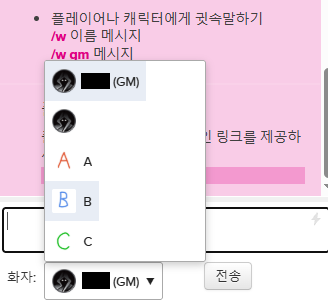
기존 배포글이 아무리 찾아도 나오질 않아 꿩 대신 챗지피티로 잡도리해서 만들었습니다.
기존 배포글을 찾게 된다면 내립니다.
개인용으로 만들어서 엉성합니다.
// ==UserScript==
// @name         Roll20 화자 선택 인장 표시
// @namespace    roll20-speaker-portraits
// @version      0.1.0
// @description  화자 선택 목록에 캐릭터 인장 이미지를 표시합니다.
// @match        https://app.roll20.net/editor/*
// @match        https://app.roll20.net/campaigns/*
// @grant        none
// @run-at       document-idle
// ==/UserScript==

(() => {
  'use strict';

  // 설정
  const CONFIG = {
    portraitSize: 24, // 인장 크기(px)
    menuMaxHeight: 320,

    // 자동으로 인장을 찾지 못할 때 직접 지정
    // 키는 드롭다운에 표시되는 캐릭터 이름과 동일하게 작성
    portraits: {
      // '캐릭터 이름': 'https://이미지주소.png',
    },
  };

  const STYLE_ID = 'r20-speaker-portrait-style';
  const WRAPPER_CLASS = 'r20-speaker-portrait-wrapper';

  // 캐릭터 이름으로 페이지 내 인장 이미지 찾기

function findPortrait(name, optionValue = '') {
      // 빈 화자 항목은 이미지 연결 제외
  if (!name || name === '화자 선택') {
    return 'https://app.roll20.net/images/character.png';
  }
  // 1. 사용자가 직접 지정한 이미지가 있으면 우선 사용
  if (CONFIG.portraits[name]) {
    return CONFIG.portraits[name];
  }

  // 2. 이미지 요소에서 실제 이미지 주소 추출
  function getImageUrl(element) {
    if (!element) return '';

    const img = element.matches?.('img')
      ? element
      : element.querySelector?.('img');

    if (img) {
      const src =
        img.currentSrc ||
        img.getAttribute('src') ||
        img.getAttribute('data-src') ||
        '';

      if (src && !src.includes('/images/character.png')) {
        return src;
      }
    }

    const background = element.style?.backgroundImage || '';
    const match = background.match(/url\(["']?(.*?)["']?\)/);

    if (match && match[1]) {
      return match[1];
    }

    return '';
  }

  // 3. 저널에서 이름이 일치하는 캐릭터를 찾아 이미지 반환
  const journalItems = document.querySelectorAll(
    'li.journalitem.character'
  );

  for (const item of journalItems) {
    const nameElement = item.querySelector('.namecontainer');
    const journalName = nameElement?.textContent?.trim();

    if (journalName !== name) continue;

    const image = getImageUrl(item.querySelector('.dd-content img'));

    if (image) {
      return image;
    }
  }

  // 4. 기존 방식의 대체 검색
  const images = document.querySelectorAll('img');

  for (const img of images) {
    const alt = img.getAttribute('alt')?.trim();
    const title = img.getAttribute('title')?.trim();

    if (alt === name || title === name) {
      const image = getImageUrl(img);
      if (image) return image;
    }
  }

  return 'https://app.roll20.net/images/character.png';
}


  function addStyles() {
    if (document.getElementById(STYLE_ID)) return;

    const style = document.createElement('style');
    style.id = STYLE_ID;
    style.textContent =
      .${WRAPPER_CLASS} {
        position: relative !important;
        display: inline-flex !important;
        vertical-align: middle;
        min-width: 160px;
        font: inherit;
        color: #222;
        z-index: 1000;
      }

      .r20-portrait-trigger {
        width: 100%;
        min-height: 30px;
        display: flex;
        align-items: center;
        gap: 7px;
        padding: 3px 7px;
        background: #fff;
        color: #222;
        border: 1px solid #aaa;
        border-radius: 3px;
        cursor: pointer;
        text-align: left;
        font: inherit;
      }

      .r20-portrait-trigger img,
      .r20-portrait-option img {
        width: ${CONFIG.portraitSize}px;
        height: ${CONFIG.portraitSize}px;
        flex: 0 0 ${CONFIG.portraitSize}px;
        object-fit: cover;
        border-radius: 2px;
      }

      .r20-portrait-label {
        overflow: hidden;
        text-overflow: ellipsis;
        white-space: nowrap;
        flex: 1;
      }

      .r20-portrait-arrow {
        margin-left: auto;
        font-size: 10px;
      }

      .r20-portrait-menu {
        position: absolute;
        bottom: 100%;
        top: auto;
        left: 0;
        min-width: 100%;
        width: max-content;
        max-width: 300px;
        max-height: ${CONFIG.menuMaxHeight}px;
        overflow-y: auto;
        background: #fff;
        color: #222;
        border: 1px solid #aaa;
        box-shadow: 0 3px 8px #0003;
        border-radius: 3px;
        z-index: 99999;
      }

      .r20-portrait-option {
        display: flex;
        align-items: center;
        gap: 7px;
        width: 100%;
        min-height: 32px;
        padding: 4px 7px;
        border: 0;
        background: #fff;
        color: #222;
        text-align: left;
        font: inherit;
        cursor: pointer;
      }

      .r20-portrait-option:hover,
      .r20-portrait-option[aria-selected="true"] {
        background: #e8edf5;
      }

      .r20-portrait-placeholder {
        width: ${CONFIG.portraitSize}px;
        height: ${CONFIG.portraitSize}px;
        flex: 0 0 ${CONFIG.portraitSize}px;
        background: #ddd;
        border-radius: 2px;
      }
    ;

    document.head.appendChild(style);
  }

  function enhanceSelect(select) {
    if (select.dataset.r20PortraitEnhanced === '1') return;
    if (!select.options || select.options.length < 1) return;

    select.dataset.r20PortraitEnhanced = '1';

    const wrapper = document.createElement('div');
    wrapper.className = WRAPPER_CLASS;

    select.parentNode.insertBefore(wrapper, select);
    wrapper.appendChild(select);

    // 기존 select는 유지해 Roll20의 이벤트 처리를 보존
    select.style.setProperty('display', 'none', 'important');

    const trigger = document.createElement('button');
    trigger.type = 'button';
    trigger.className = 'r20-portrait-trigger';
    trigger.setAttribute('aria-haspopup', 'listbox');
    trigger.setAttribute('aria-expanded', 'false');

    const menu = document.createElement('div');
    menu.className = 'r20-portrait-menu';
    menu.setAttribute('role', 'listbox');
    menu.hidden = true;

    wrapper.append(trigger, menu);

function createImage(name, optionValue = '') {
  const src = findPortrait(name, optionValue);

      if (!src) {
        const placeholder = document.createElement('span');
        placeholder.className = 'r20-portrait-placeholder';
        placeholder.setAttribute('aria-hidden', 'true');
        return placeholder;
      }

      const img = document.createElement('img');
      img.src = src;
      img.alt = '';
      img.draggable = false;
      img.onerror = () => {
        img.replaceWith(createPlaceholder());
      };
      return img;
    }

    function createPlaceholder() {
      const placeholder = document.createElement('span');
      placeholder.className = 'r20-portrait-placeholder';
      placeholder.setAttribute('aria-hidden', 'true');
      return placeholder;
    }


function selectedText() {
  return select.options[select.selectedIndex]?.textContent?.trim() ?? '';
}


    function updateTrigger() {
      const name = selectedText();
      trigger.replaceChildren(
        createImage(
  name,
  select.options[select.selectedIndex]?.value || ''
)
      );

      const label = document.createElement('span');
      label.className = 'r20-portrait-label';
      label.textContent = name;

      const arrow = document.createElement('span');
      arrow.className = 'r20-portrait-arrow';
      arrow.textContent = '▼';

      trigger.append(label, arrow);
    }

    function rebuildMenu() {
      menu.replaceChildren();

      [...select.options].forEach((option, index) => {
        const name = option.textContent.trim();
        const item = document.createElement('button');

        item.type = 'button';
        item.className = 'r20-portrait-option';
        item.setAttribute('role', 'option');
        item.setAttribute(
          'aria-selected',
          String(index === select.selectedIndex)
        );

item.appendChild(createImage(name, option.value));

        const label = document.createElement('span');
        label.className = 'r20-portrait-label';
        label.textContent = name;
        item.appendChild(label);

        item.addEventListener('click', () => {
          select.selectedIndex = index;
          select.dispatchEvent(new Event('input', { bubbles: true }));
          select.dispatchEvent(new Event('change', { bubbles: true }));

          updateTrigger();
          closeMenu();
        });

        menu.appendChild(item);
      });
    }

    function openMenu() {
      rebuildMenu();
      menu.hidden = false;
      trigger.setAttribute('aria-expanded', 'true');
    }

    function closeMenu() {
      menu.hidden = true;
      trigger.setAttribute('aria-expanded', 'false');
    }

    trigger.addEventListener('click', () => {
      if (menu.hidden) openMenu();
      else closeMenu();
    });

    document.addEventListener('click', event => {
      if (!wrapper.contains(event.target)) closeMenu();
    });

    select.addEventListener('change', () => {
      updateTrigger();
      rebuildMenu();
    });

    updateTrigger();
  }

  function scan() {
    addStyles();

    // Roll20 버전이나 화면에 따라 선택자 구조가 다를 수 있음
    const selectors = [
      'select#speakingas',
      'select[name="speakingas"]',
      'select.speakingas',
      'select[name*="speaking"]',
      'select[id*="speaking"]',
    ];

    const found = new Set();

    selectors.forEach(selector => {
      document.querySelectorAll(selector).forEach(select => {
        found.add(select);
      });
    });

    found.forEach(enhanceSelect);
  }

  scan();

  // Roll20은 화면 요소를 동적으로 생성할 수 있음
  const observer = new MutationObserver(() => scan());
  observer.observe(document.body, {
    childList: true,
    subtree: true,
  });
})();'여러가지 > 정리' 카테고리의 다른 글
| 인세인 진행 방식 설명 (0) | 2025.12.31 |
|---|---|
| roll20 채팅로그 백업 방법 (0) | 2025.04.09 |
| 다녀온 시날 브금, 자료 정리 (0) | 2025.02.06 |


댓글